Social Care
LONE WORKER SAFETY FOR SOCIAL CARE

Help protect care staff working alone in people’s homes and community settings.

ClockOn gives care organisations GPS-verified arrival, expected visit duration, overdue-visit alerts, travel records and accurate working hours without continuously tracking the worker.

£10 per active care worker / month · Company Owner, Admin, Payroll and HR users are free · Optional Holiday Planner included at no extra charge.

WHY SOCIAL CARE TEAMS USE CLOCKON

More visibility for the company. More protection for the people doing the work.

Give coordinators and line managers a simple safety view across community visits while improving payroll-quality time records.

FOR THE COMPANY

Manage risk, hours and field operations with better evidence.

✓
Home-visit safety timer

Staff set the expected duration after arriving, giving each lone visit a clear expected checkout time.

✓
Automatic overdue alerts

A visit that runs beyond its expected time can trigger an in-app alert and email to the nominated line manager.

✓
Visit arrival evidence

GPS and server time confirm the key arrival and departure events.

✓
Better rota visibility

See who is travelling, currently at a visit, finished or overdue without calling every worker.

✓
Hours and travel together

ClockOn captures the full working day, including travel between people’s homes.

✓
Payroll and absence records

Overtime, sickness, unpaid leave and other absence information can be prepared for Payroll from one system.
FOR STAFF

A simple app that protects the worker as well as the timesheet.

For care staff, ClockOn adds a simple layer of reassurance when a visit takes longer than planned.

✓
Backup on lone visits

If you have not checked out when expected, your line manager can be prompted to make sure you are OK.

✓
No need to call after every visit

Your normal ClockOn actions keep the office informed without adding another phone call.

✓
Overtime is visible

If visits run late, the recorded hours help Payroll see the real finish time.

✓
Travel is recognised

Time spent moving between visits is part of the recorded working day.

✓
Simple reference-based records

ClockOn can use visit references without turning the app into a care-record or clinical-record system.

✓
No constant GPS monitoring

Location is recorded at defined work and safety actions, not continuously throughout your shift.

FREE OPTIONAL HOLIDAY PLANNER

Add holiday management for the staff who need it — with no extra charge.

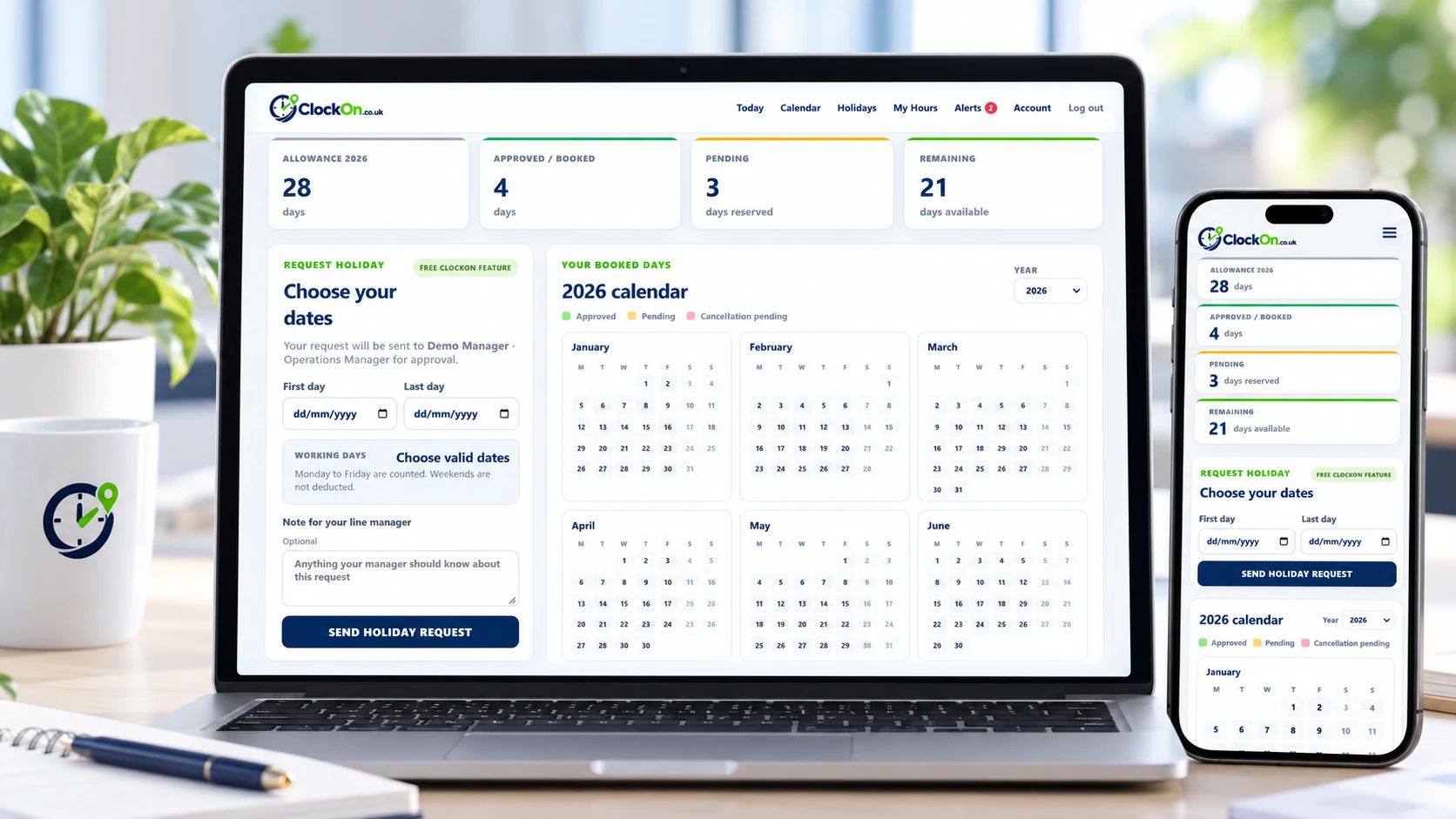
Holiday Planner is included with ClockOn. Enable it for individual staff members so they can request leave, see their booked days and allowance, and request cancellations directly from the same app they already use for work.

ClockOn Holiday Planner shown on desktop and mobile

Request holidays in ClockOn

Staff get a clear, responsive Holiday Planner showing allowance, approved leave, pending requests and remaining days.

Approve requests & cancellations

Requests go to the employee's existing line manager. Approved holiday cancellations also require manager approval before days are returned.

See who is off

The company Holiday Calendar gives managers an at-a-glance view of approved and pending leave across the team.

LONE & MOBILE WORKER SAFETY

If a home visit overruns, the line manager can be alerted.

The worker chooses an expected duration when they arrive. ClockOn closes the safety check when they leave normally; otherwise it escalates the overdue visit so the company can make contact.

Supports your procedures. ClockOn provides timestamped records, alerts and workforce visibility that can support health & safety, lone-working and working-time processes. It does not replace your organisation's risk assessments, emergency procedures or legal duties.
14:00
ARRIVEDGPS verified
45m
EXPECTED VISITWorker chooses Hours + Minutes
14:45
NO CHECKOUTExpected finish has passed
ALERT
LINE MANAGERIn-app alert + email escalation
HOW CLOCKON WORKS

A simple journey from setting off to safely finishing.

Six clear actions give staff an easy workflow while ClockOn builds the safety, hours and journey record automatically.

01
START JOURNEY

Setting Off

GPS and server time confirm the journey has started.

02
CHECK IN

Arrived

Arrival confirms the worker reached the location safely.

03
STAY SAFE

Safety Check

Set the expected visit time so an overdue appointment can be escalated.

04
RECORD ISSUES

Delays & Evidence

Record client delays, notes and photos when work cannot continue.

05
NEXT MOVE

Leaving

Move to another job, head home or travel to accommodation.

06
DAY COMPLETE

Finished

Close the day with hours, travel and overtime ready for review.

BUILT FOR SOCIAL CARE

Practical for the way care staff actually work.

✓Domiciliary care
✓Community support workers
✓Outreach services
✓Supported-living and visiting teams
SOCIAL CARE TEAMS

Teams and roles ClockOn can support in Social Care.

ClockOn is designed for mobile, field and lone-working teams across this industry. The examples below show the types of roles the Social Care platform can support.

✓Domiciliary Care Workers
✓Home Care Workers
✓Social Workers
✓Support Workers
✓Adult Social Care Teams
✓Children's Social Care Teams
✓Family Support Workers
✓Community Support Teams
✓Supported Living Staff
✓Outreach Workers
✓Housing Support Workers
✓Lone Care Workers

Don't see your exact role? ClockOn can support most mobile and lone-working teams with the same safety, journey and working-time workflow.

SAFETY + WORKFORCE MANAGEMENT

The safety layer sits on top of the operational information the business already needs.

ClockOn helps companies protect staff while producing a more accurate record of the working day.

Working-hour visibility

Driving and work events contribute to daily totals so unusually long days can be identified.

Overtime records

Actual event times help make sure additional hours are visible and reach Payroll faster.

Accommodation

Multi-day workers can finish at accommodation instead of being incorrectly shown as home.

Payroll preparation

Authorised users can review hours, overtime, pay settings, sickness and absence information.

Journey context

Google Routes comparisons can help managers understand travel time and larger journey variances.

Client Delay

Record time lost to access or client issues with notes and supporting images where relevant.

STAFF PRIVACY

Safety visibility without constant surveillance.

ClockOn does not need to continuously follow a worker around. GPS is requested at important actions such as Setting Off, Arrived, Leaving and Finished, and at defined safety events where the company has enabled them.

This gives managers useful evidence while keeping the employee workflow clear and proportionate.

SEE THE REAL PRODUCT

Simple for staff. Detailed for authorised managers.

The field PWA keeps actions straightforward while Company Admin, HR and Payroll users get the information they need to manage the workforce.

FIELD STAFF APP

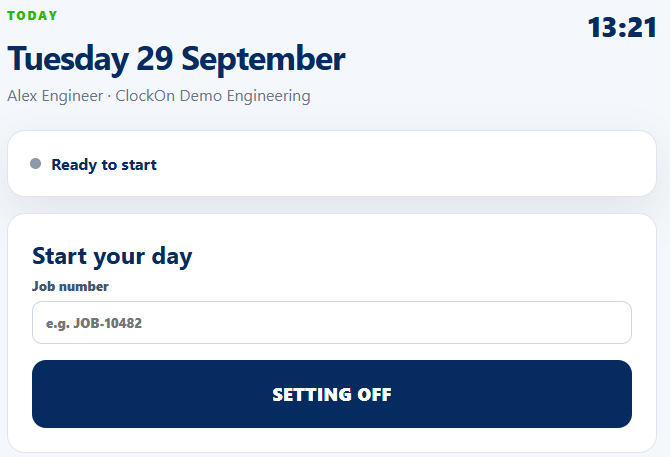
One visit reference and one clear next action.

Care staff use straightforward buttons while ClockOn records the server time and requested GPS evidence behind the event.

ClockOn Social Care field staff Today screen
COMPANY DASHBOARD

See the team without repeatedly calling the team.

Authorised users can see working, travelling, on-location, overdue, finished and accommodation status alongside hours and alerts.

ClockOn Social Care company dashboard
CLOCKON FOR SOCIAL CARE

Give your mobile workforce an extra layer of protection.

GPS-verified work events, lone-worker safety checks, accurate working hours, payroll-ready records and an optional Holiday Planner included at no extra charge — all in one simple app.